How to Choose the Right Lighting for Offices?

Time:2026-09-09 Author:Henry
0%

Choosing office lighting is not merely a matter of selecting attractive fixtures. It affects visual comfort, energy use, concentration, and how people experience a workplace. The International Energy Agency reports that lighting represents approximately 15% of global electricity consumption, making efficient design an important operational decision. Light is infrastructure.

This guide explains How To Choose Lighting For Offices through practical criteria and recognized professional guidance. CIBSE’s LG7 Office Lighting Guide and EN 12464-1 commonly support around 500 lux for general office tasks, while controlling glare remains equally important. A bright desk can still feel uncomfortable when a monitor reflects a ceiling panel. Small details matter. The WELL Building Standard also encourages daylight access, controllability, and lighting conditions that support occupants’ daily rhythms.

Research supports a careful approach, but it does not offer one universal formula. The World Green Building Council has linked better indoor environmental quality with potential productivity improvements of 8–11%, although outcomes vary by building, task, and employee needs. That uncertainty deserves attention. A designer should examine window direction, screen placement, ceiling height, shift patterns, and individual sensitivity before specifying products. LEDs may reduce energy demand, yet poor colour quality or excessive blue-rich light can create new complaints. The right solution may combine daylight, dimmable LED layers, task lighting, occupancy sensors, and simple user controls. A short trial in a real workspace can reveal more than a polished catalogue. This introduction sets out a balanced method for choosing lighting that performs reliably, supports people, and remains practical to maintain.
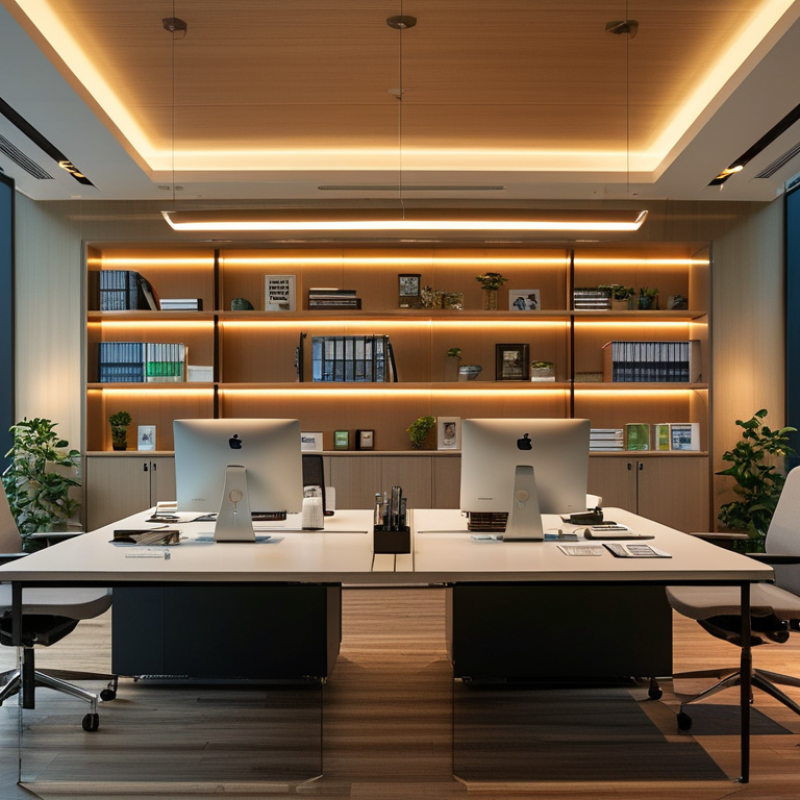
How to Choose the Right Lighting for Offices?

Assess Office Activities, Layout, and Lighting Needs

How to Choose the Right Lighting for Offices?

Assess Office Activities, Layout, and Lighting Needs

Effective office lighting begins with observing daily work, not choosing fixtures from a catalogue. A reception desk needs welcoming light, while drafting stations require accurate visual detail. Meeting rooms may need adjustable brightness for presentations and face-to-face discussion. Watch the screens. People notice glare quickly.

Walk through the office at different times. Morning sunlight can brighten one side, while afternoon shadows may cover another. Desks near windows often need blinds and softer overhead lighting. Open-plan areas benefit from evenly distributed illumination, but private rooms may need separate controls. I have found that adjustable task lights help employees adapt their workspace without disturbing colleagues.

Check ceiling height, wall colors, furniture placement, and monitor positions before finalizing a plan. Light bouncing from pale surfaces can improve comfort, although excessive brightness may still cause reflections. Choose color quality carefully when employees review drawings, products, or printed materials. A qualified lighting professional can measure illumination and verify electrical work against applicable local requirements.

A tidy layout can still feel uncomfortable. That deserves another inspection. Ask employees where their eyes feel tired, then compare those comments with measurements. Some preferences will conflict, and no plan will satisfy everyone perfectly. The practical goal is balanced light, controlled glare, and suitable flexibility for real office activities.

Compare Natural, Ambient, Task, and Accent Lighting

How to Choose the Right Lighting for Offices?

Compare Natural, Ambient, Task, and Accent Lighting

Natural light can make an office feel spacious and comfortable. Large windows support alertness, but direct sun may create glare on screens. Use blinds, sheer curtains, or adjustable shades to control changing daylight. Check workstations at different times, not only during a morning visit. That small test often reveals uncomfortable reflections.

Ambient lighting provides the room’s general brightness. Choose even, diffused illumination to reduce harsh shadows between desks. For computer work, many offices target roughly 300 to 500 lux, depending on tasks and local guidance. A qualified lighting professional should confirm levels with a calibrated lux meter. Bright does not always mean effective.

Task lighting adds focused support for reading, writing, or detailed work. Adjustable desk lamps help employees control brightness without over-lighting the entire room. Accent lighting can highlight artwork, reception walls, or architectural features. Keep it subtle. Strong decorative contrast may distract staff or create screen reflections. A common mistake is treating every area identically. Meeting rooms, corridors, and workstations need different solutions. I would also revisit the plan after installation, because real users may still report eye strain or shadows. Good lighting design remains adjustable.

How to Choose the Right Lighting for Offices?

Comparing natural, ambient, task, and accent lighting by typical illuminance targets.

Natural daylight is variable, so the chart uses a representative planning value of 400 lux. Ambient lighting commonly supports general office circulation and open-plan areas at about 300 lux, while focused desk work typically requires around 500 lux. Accent lighting is often planned at approximately 750 lux to create visual emphasis and contrast. Actual values should be adjusted for room layout, daylight availability, glare control, screen use, and local lighting standards.

Representative planning targets based on common office-lighting guidance, including EN 12464-1 and professional illuminance recommendations. Lux values are not brand-specific.

Select Suitable Brightness, Color Temperature, and Color Rendering

Office lighting should support accurate work without making people squint, lean forward, or close blinds. EN 12464-1:2021 specifies 500 lux for typical reading, writing, and computer tasks. It also recommends a unified glare rating below 19 and a color rendering index of at least 80. These figures offer a reliable starting point, not a rigid formula.

Measure brightness at the desk, not only beneath the ceiling fixture. A dark desktop can cause eye strain, while an overlit screen creates reflections. In practice, dimmable lighting works better across changing daylight conditions. Many offices begin near 400–500 lux, then adjust after observing real tasks. Small changes matter.

Choose a neutral color temperature around 3500–4000K for most work areas. Cooler light may feel alert, but excessive blue-white light can appear harsh late in the day. The International WELL Building Institute emphasizes visual comfort and occupant control in its WELL v2 lighting criteria. Use CRI 80 or higher for general offices, and CRI 90 or higher where employees judge colors, materials, or printed graphics. The IES Lighting Handbook also stresses task needs, surface reflectance, and glare control.

Do not trust numbers alone. A 500-lux room can still feel uncomfortable. One overlooked issue is contrast between a bright window and a dim workstation. Test the space at morning, noon, and late afternoon. Then revise the settings. Lighting design is partly measurement, partly observation, and sometimes a careful compromise.

Plan Fixture Placement, Controls, and Energy Efficiency

How to Choose the Right Lighting for Offices?

Plan fixture placement around the work, not just the ceiling grid. Desks need even illumination without bright patches on screens. Place fixtures parallel to window walls when possible. This reduces reflected glare on monitors. In a typical open office, keep light sources away from direct sightlines. A worker should not see a bright fixture reflected in a dark display. Corridors, meeting rooms, and storage areas need different lighting levels. One uniform setting often wastes energy.

Use separate controls for daylight zones, desks, meeting rooms, and circulation paths. Occupancy sensors can switch lights off in empty rooms. Daylight sensors should dim fixtures near windows as sunlight changes. Give users simple wall controls. Complicated controls are often ignored. Keep manual override available.

Test the plan at different times of day. Morning sunlight may expose glare that afternoon testing misses. Measure light at desk height, not only across the floor. Check screens, whiteboards, and faces during video calls. An efficient fixture is not efficient if workers add desk lamps all day. That mistake happens.

Choose efficient equipment with suitable color quality and easy maintenance. Lower energy use matters, but comfort protects concentration and reduces complaints. Schedule cleaning and inspection, especially where dust collects above workstations. Reconsider the layout after occupancy. Real behavior rarely matches the drawing. A quiet corner may need more control than expected, while a bright window zone may need less output.

How to Choose the Right Lighting for Offices? - Plan Fixture Placement, Controls, and Energy Efficiency

Office Zone Typical Illuminance Target Recommended Fixture Placement Suitable Fixture Type Lighting Controls Color Temperature Glare and Visual Comfort Energy Efficiency Guideline
Open-Plan Workstations 300–500 lux
on the work plane
Use a regular grid aligned with desks. Keep fixtures centered over circulation-free work areas and coordinate spacing with ceiling height and photometric distribution. Recessed or suspended direct/indirect LED luminaires with broad, uniform distribution. Occupancy sensing Daylight dimming Local zoning 3500–4000 K Select low-glare optics and avoid placing bright fixtures directly in front of monitors. A low-glare design is especially important for screen-based work. Use high-efficacy LED equipment and reduce output near windows through automatic dimming.
Private Offices 300–500 lux
on the desk
Position the main fixture to illuminate the desk without creating reflected glare on the monitor. Add a task light when desk layouts vary. Recessed, surface-mounted, or suspended LED fixture combined with an adjustable task light. Vacancy sensing Manual dimming 3500–4000 K Use diffused or controlled luminance sources and maintain balanced brightness between the desk, walls, and surrounding space. Vacancy controls are appropriate because the room may remain unoccupied for extended periods.
Conference and Meeting Rooms 300–500 lux
general lighting
Arrange fixtures to provide even vertical illumination on faces and presentation walls. Keep fixtures away from projector sightlines. Dimmable recessed or suspended LED fixtures, with optional wall-washing components. Scene control Occupancy sensing Dimming 3000–4000 K Control reflected glare on screens and whiteboards. Separate presentation lighting from table lighting where possible. Pre-programmed scenes such as Meeting, Presentation, Video Call, and Cleaning can reduce unnecessary full-output operation.
Reception and Waiting Areas 200–300 lux
general lighting
Combine ambient lighting with accent or wall-washing light. Maintain clear illumination at the reception counter and entrances. Recessed or surface-mounted ambient fixtures with decorative pendants or adjustable accent lighting where appropriate. Time scheduling Daylight sensing Dimming 3000–3500 K Use comfortable, uniform brightness and avoid sharp contrasts between the entrance, reception desk, and waiting area. Schedule lower output outside operating hours while retaining required security and emergency illumination.
Circulation and Corridors 100–200 lux
on the floor
Space fixtures consistently along the corridor centerline or use perimeter-mounted fixtures to support wayfinding and wall illumination. Linear, surface-mounted, or recessed LED fixtures with wide distribution. Occupancy sensing Bi-level control 3000–4000 K Avoid abrupt changes in brightness and minimize glare at intersections, stair approaches, and doorways. Bi-level operation can maintain a reduced background level and increase output when movement is detected.
Break Rooms and Cafeterias 200–300 lux
general lighting
Provide even ambient light over tables and counters. Supplement food-preparation surfaces with dedicated task lighting. Surface-mounted or suspended LED fixtures with sealed or easy-clean options near food-preparation areas. Occupancy sensing Manual dimming 3000–4000 K Use diffuse optics over seating areas and control reflections from glossy tables and countertops. Use separate control zones for seating, counters, vending areas, and back-of-house spaces.
Copy, Print, and Support Areas 300–500 lux
on work surfaces
Place fixtures over printers, counters, and document-handling surfaces. Avoid shadows caused by tall storage units. Recessed or surface-mounted LED fixtures with moderate-to-wide distribution. Occupancy sensing Short time delay 3500–4000 K Ensure sufficient light for reading labels and documents without producing high brightness near eye level. Automatic shutoff or reduced-output operation is effective because these areas are often intermittently occupied.
Storage and Utility Rooms 100–200 lux
on the floor
Place fixtures between storage rows and near doors. Ensure shelves do not block the light distribution. Surface-mounted or linear LED fixtures with durable housings. Occupancy sensing Automatic shutoff 3500–4000 K Provide adequate vertical illumination for identifying stored items and avoid dark corners near shelving. Controls should prevent lights from operating continuously in intermittently occupied rooms.
Planning notes: Illuminance values are typical office-planning ranges and should be verified against the applicable local standard, task requirements, occupant needs, and daylight conditions. Final fixture spacing should be based on the luminaire photometric data, ceiling height, surface reflectance, maintenance factor, and the required uniformity. Emergency lighting, accessibility, electrical safety, and glare limits should be reviewed separately by the project design team.

Verify Visual Comfort, Safety, Accessibility, and Maintenance

Choosing office lighting requires more than counting fixtures. Verify visual comfort at desk height, not only on a ceiling plan. EN 12464-1 recommends about 500 lux for many office tasks, with unified glare rating (UGR) below 19. A 500-lux target is useful, but it is not magic. Screen reflections, bright windows, and uneven brightness can still cause discomfort. Glare ruins concentration.

Safety begins with consistent illumination on walkways, stairs, and shared equipment. Check emergency lighting against local codes and record test results. Accessibility also matters. Provide adjustable task lights, readable controls, and lower-glare options for people with light sensitivity or visual impairments. ISO 21542 emphasizes usable environments, yet lighting alone cannot solve every accessibility problem. Ask occupants what fails. They may notice flicker before a meter does.

Maintenance should be planned from day one. The U.S. Department of Energy reports that lighting represents roughly 15% of global electricity use, making efficient operation financially relevant. Specify replaceable components, accessible drivers, and realistic lumen-maintenance values. Keep a simple log for cleaning, failures, and measured lux levels. Measure, do not guess. Controls can reduce unnecessary runtime, but poorly commissioned sensors create dark corners and complaints. That part is often underestimated. Review the installation after several weeks, because a technically compliant design may still feel uncomfortable in daily use.

FAQS

: How should an office assess its lighting needs?

: Observe reception desks, workstations, meeting rooms, corridors, and storage areas. Different tasks need different light. Walk through the office morning and afternoon. Record glare, shadows, screen reflections, and tired eyes.

How does natural light affect office comfort?

Windows can make rooms feel spacious and alert. Direct sunlight may reflect across dark screens. Use blinds, sheer curtains, or adjustable shades. Check window-side desks at different times. Morning conditions can mislead.

What ambient lighting level suits computer work?

Many offices use roughly 300 to 500 lux for computer tasks. Local guidance and task demands may change this range. A qualified professional should measure light with a calibrated lux meter. Bright is not always effective.

When is task lighting useful?

Task lights support reading, writing, drafting, and detailed review. Adjustable desk lamps let workers control brightness locally. They can reduce the need for excessive overhead lighting. Do not aim lamps directly at screens.

Where can accent lighting be used?

Accent lighting can highlight artwork, reception walls, or architectural details. Keep the contrast gentle. Strong decorative light may distract employees. It may also create screen reflections. Subtle usually works better.

How should fixtures be positioned around desks?

Place fixtures parallel to window walls when possible. Keep bright sources away from direct monitor sightlines. Measure light at desk height, not only across the floor. Check screens, whiteboards, and faces during video calls. Layout drawings can be wrong.

What lighting controls improve flexibility and energy use?

Use separate controls for daylight zones, desks, meeting rooms, and corridors. Occupancy sensors can switch off lights in empty rooms. Daylight sensors can dim fixtures near windows. Provide simple wall controls and manual overrides. Complicated controls are often ignored.

How can an office verify the lighting plan after installation?

Test the space at different times of day. Ask employees where their eyes feel tired. Compare their comments with measured illumination and screen reflections. Inspect dusty fixtures and clean them regularly. Real behavior rarely matches the drawing. A perfect plan is unlikely.

Conclusion

How To Choose Lighting For Offices begins with understanding how each workspace is used, from focused computer work and meetings to collaboration and relaxation. Evaluate the office layout, available daylight, ceiling height, wall colors, and areas that require stronger or softer illumination. A balanced plan may combine natural light, general ambient lighting, task lighting for detailed activities, and accent lighting to emphasize architectural or shared spaces. Each layer should support the purpose of the area without creating harsh contrasts or distracting glare.

Select brightness levels, color temperature, and color rendering quality that promote concentration while maintaining a comfortable atmosphere. Fixtures should be positioned to reduce shadows and reflections on screens, with controls that allow users to adjust lighting by zone or time of day. Energy-efficient operation, occupancy sensors, and daylight-responsive settings can reduce unnecessary consumption. Before completion, check visual comfort, safety, accessibility, ease of cleaning, replacement needs, and long-term maintenance so the lighting system remains practical and supportive for everyone.

Henry

Henry

Henry is a dedicated marketing professional with a profound expertise in the company's offerings. With years of experience in the industry, he possesses an impressive understanding of the market dynamics and consumer behaviors that drive success. Henry is committed to sharing his insights through......